Posts mit dem Label FilmVideAndPhoto werden angezeigt. Alle Posts anzeigen

2020-02-17

BMPCC4K Control app - new users

Project history

  1. Previous project: name with link
  2. BMPCC4K Control app - Resolutions
  3. current posting
  4. next step
  5. Next project:


There is a surprisingly large number of new users for my
BMPCC4K app in January.

I guess I should get back to some of the items accumulating in the backlog.

Links:

2019-12-01

BMPCC4K Control app - Resolutions

Project history

  1. Previous project: LPG/CNG Price Reporter
  2. BMPCC4K Control app - URSA Mini Pro G2
  3. current posting
  4. next step: BMPCC4K Control app - new users
  5. Next project: designing a chain link tool library

Some updates on my BMPCC4K Camera Control App. (That  also supports the BMPCC6K, UMP and UMP G2)

Blackmagic never got around to adding the missing values to the "1.0 Video Mode" command of their bluetooth protocol. They even added new resolutions without adding the constants to support them via Bluetooth.

But I got a hint about a workaround for this issue and now all supported resolutions on BMPCC4K, BMPCC6K, UMP and UMP G2 should be supported.
You can also only select resolutions that fit the currently selected frame rate

Links:

2019-06-27

BMPCC4K Control app - URSA Mini Pro G2

Project history

  1. Previous project: LPG/CNG Price Reporter
  2. old posting BMPCC4K can select 4K and 4.6K resolutions
  3. current posting
  4. BMPCC4K Control app - Resolutions
  5. Next project: designing a chain link tool library

Finally a user sent me the idenfification string for the URSA Mini Pro G2.
Blackmagic does not document the exact strings the cameras use in Bluetooth to identify themself.

I added support for the G2 to behave just like the URSA Mini Pro in the latest Beta release.

Links:

    2019-06-12

    BMPCC4K can select 4K and 4.6K resolutions

    Project history

    1. Previous project: LPG/CNG Price Reporter
    2. old posting BMPCC4K app gets presets
    3. current posting
    4. next step: BMPCC4K Control app - URSA Mini Pro G2
    5. Next project: designing a chain link tool library


    In firmware 6.3 Blackmagic finally offers a way to select the different 4K and 3K/4.6K(UMP only of cause) resolutions via Bluetooth.
    So I'm about to add these to my "BMPCC4K control" app.

    Status


    Update (2019-06-17): I tried it with the BMPCC4K and firmware 6.4 and it didn't work. I'm in contact with Blackmagic. My suspicion is that this was only rolled out for the URSA and not the BMPCC4K yet.

    Get Support

    If you have any issues with the app, please contact me using the email address mentioned in the Play Store. If you don't speak up, I can't help you.
    Also, reviews in Play Store are not a chat. They are product reviews. Not a place to ask questions and expect an answer.

    Connection Issues

    If you can't get a connection via Bluetooth or can't find your (already paired) camera, it's often a crappy Bluetooth Stack in your phone.
    In that case rebooting the phone is your best hope. Bluetooth and especially Bluetooth Low Energy is not Googlen's or most manufacturer's highest priority when it comes to Android. The API to access BLE is already pretty crappy compared to most other Android APIs and the underlying implementation is grown as more and more things have been added to the different versions of the Bluetooth standards. All of these versions the phone has to support at the same time. Nothing an app can do about that. Only Google and the phone manufacturer can fix their bugs and I can fix mine.

    Stability

    On a positive note, there is still not a single crash or "application not responding" automatically reported in any version of the app installed via Play Store since late 2018.

    Links:

      2019-05-18

      BMPCC4K app gets presets

      Project history

      1. Previous project: LPG/CNG Price Reporter
      2. old posting New BMPCC4K firmware - this time with BRaw
      3. current posting
      4. next step BMPCC4K can select 4K and 4.6K resolutions
      5. Next project: designing a chain link tool library


      I did not have much time to do anything on my BMPCC4K Camera Control - Android App lately but I did manage to publish a new, public beta version today that has a new tab for storing and recalling the current camera settings as presets.

      My camera is currently used on a film set, so it will take me until at least next week to properly test this Beta to offer it as a stable release.

      Links:

          2019-03-06

          New BMPCC4K firmware - this time with BRaw

          Project history

          1. Previous project: LPG/CNG Price Reporter
          2. old posting New BMPCC4K firmware
          3. current posting
          4. next step: BMPCC4K app gets presets
          5. Next project: designing a chain link tool library


          Again we get a firmware update (6.2) for the Blackmagic cameras.
          This time it finally includes the BM-Raw support.
          However they had to remove the support for Cinema-DNG.

          I'll add the ability to select BM-Raw to the BMPCC4K Camera Control - Android App at once.

          Update: The new Android app is released

          However there is one issue. There is no way to determing what the camera supports.
          This was already the case with the supported resolutions on the URSA Mini Pro.
          So either I add BMraw and drop CDNG and cameras with older firmwares will loose the ability to have Cinema-DNG selected or add both and on older and newer camera firmware's there will be unsupported but selectable options.
          Here's the answer from Blackmagic:

          Hi Marcus,Unfortunately there is no facility to read back the Camera version with the Camera Control protocol, as such it is not possible to determine whether Cinema-DNG is supported or not. I have put in a change request to add this feature in a future release, but this doesn't help you with this request.Kind Regards(name redacted)
          I'll also see if 4K and 4.6K  resolutions can not be set via Bluetooth. The protocol documentation is still in a state of October last year, so new constants are defined  for these resolutions but I can guess and try.

          BTW:


          • I am offering the app at half the price for a week only (until 2019-03-08). Including all future updates.
          • There has not been a single crash and not a single "application not responding" since as far as Google Play Store can go back and not a single one in the last 2 app versions ever.

          2019-02-05

          New BMPCC4K firmware

          Project history

          1. Previous project: LPG/CNG Price Reporter
          2. last step: Mysterious crash
          3. current posting
          4. next step: New BMPCC4K firmware - this time with BRaw
          5. Next project: none


          Looks like there is a new camera firmware for the Blackmagic Pocket Cinema Camera 4K.

          Since the Bluetooth protocol I used to write my "BMPCC4K Camera Control" Android app did not support some features of this camera yet. I'll give it a try and see what has improved....

          Stay tuned!


          Stable Releases:

          Open Beta Test: (early access to improvements)


          Links 

          2018-12-03

          Rant about the 8Sinn cage for the BMPCC4K

          I just wrote the following feedback to the very expensive 8Sinn cage for the Blackmagic Pocket Cinema Camera 4K:

          I have your Blackmagic Pocket Cinema Camera 4K -cage.
          There are 3 features you should definately improve:

          1: Access to the locking power socket is nearly inpossible.
          Getting your fingers in there is a nightmare even without fighting the cover doors.

          2: The cable strain-relieve for the USB-port does not open wide enough to allow
          the cable that comes with the Samsung T5 to fit and the expensive Samsung T5
          holder did not come with a cable that does.

          3: The allen key(s) has no place to store it in the cage itselt.
          So it's always missing.
          I can't mount my T5 SSD becaue I only have the caged camera with me.
          The cable stress relieve on the T5-holder can not be opened without
          and it's comes tighened from the factory.
          This step should be possible, if not trivial, without easy-to-loose tools.
          What's the point of having nice, machined handles if you need an allen
          key anyway?
          At the very least a laser-marking what size of tool one needs to send
          someone to buy for the next day of shooting would have helped.

          Also:
          The cage uses 2 sizes of allen key.
          However the SSD holder uses a THIRD size for no obvious reason.
          The smaller size, already used in the cage looks like it would have worked just fine
          without adding an additional, easy to loose, tool to the mix.


          Also:
          A second hot shoe (maybe as part of the SSD-holder) would be nice,
          so I can mount my microphone while having the SSD semi-permanently attached.
          (Of cause I can screw in an additional hot shoe. But it would have been nice if this
          was something that just works out of the box.)

          2018-11-07

          Android App for Blackmagic Pocket Cinema Camera 4K

          Project history 

          1. Previous project: LPG/CNG Price Reporter
          2. last step: none
          3. current posting
          4. next step: Mysterious crash
          5. Next project: none

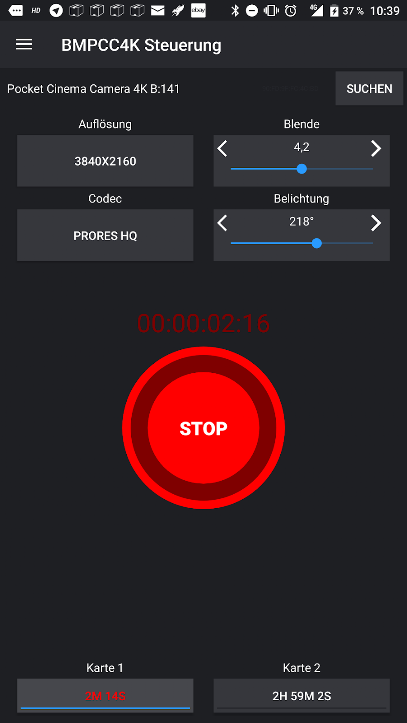
          Screenshots

          Minimal start screen while recording...
          ...while idle...

          ...and before a connected to a camera.
          Very early version of the focus slider.

          Android Wear smartwatch.
          Selection of some settings values.

          Intention


          I've just written an Android app that is capable of starting and stopping a recording on the Blackmagic Pocket Cinema Camera 4K  (BMPCC4K) and the
          URSA Mini Pro (no wireless focus supports on the EF mount version) as well as the
          URSA Mini Broadcast.

          It can
          • Start/Stop a recording remotely
          • Start and Stop using an Android Wear smartwatch (for Vloggers)
          • display a live timecode, remaining time on storage medium and the most important parameters
          • pull wireless live focus and zoom via touchscreen
          • store and recall 3 combinations of focus and zoom with a smooth transition
          • change parameters - codec, resolution and frame rate (some values not offered yet)
          • edit metadata

          I am still adding features.
          I plan to
          1. allow syncing the GPS-time of the phone to the camera(s)
          2. allow to start/stop recording on multiple cameras e.g. for multicam interviews. (No idea for a good user interface yet. Proposals?)
          3. Support the Panasonic GH5 / GH4R / GH4 camera via Wifi in addition to Blackmagic cameras via Bluetooth Low Energy
          Limitations beyond my control:
          • My idea to also display audio meters will not work because the camera does not seem to send these via Bluetooth.
          • DCI 4K and 4.6K resolutions can not be selected because Blackmagic forgot to define the values in the protocol 
            • Support ticket DEV-144. These will be fixed in a future firmware.
          • Also the camera does not seem to report the selected storage medium correctly.
            • I'm getting a small CFast card to experiment with this.


          Stable Releases:

          Open Beta Test: (early access to improvements)

          Pricing

          Yes, I did put a reasonable price tag of 10€ on it.
          That's 20% the price of a power-cable set or 14% of an original Canon-battery or a meal at McDonalds.
          Sales tax gets 19% of the shown price (depending on the country) and Google a cut of 30%. So it's just about 6,30€ that actually end up in my pocket to pay for small expenses.

          Privacy Policy

          (This is required by Google Play Store.)

          This app does not collect, use or distribute any kind of personal data.
          End of story.

          Updates

          version "1.2.37" (01.12.2019)

          • offer all resolutions on all cameras
          • only offer resolutions matching the current sensor frame rate

          version "1.2.36 Beta" (13.07.2019)

          • bugfix in preset selection
          • BMPCC6K support

          version "1.2.35 Beta" (06.07.2019)

          • show valid shutter angle values if camera is set to shutter time

          version "1.2.34 Beta" (27.06.2019)

          • Added support for the URSA Mini Pro G2

          version "1.2.34 Beta" (16.06.2019)

          • BMPCC4K: Ability to select DCI 4K with Camera firmware 6.3 or newer (Blackmagic FINALLY fixed this)
            • Tested and DOESN'T WORK YET (at least not the way it was documented). Am currently in contact with Blackmagic.
          • URSA Mini Pro: Ability to select Anamorphioc 3K, DCI 4K, 4K 16:9, 4.6K 1.4:1 and 4.6K resolutions (untested, that's why it's beta)
          • Dropped the "new firmware" note in the BM-RAW codecs
          • Text "connection lost" is no longer obscured by the card-slot buttons

          vesion "1.2.33" (01.06.2019)

          vesion "1.2.31 Beta" (18.05.2019)

          vesion "1.2.29" (16.03.2019)

          • Permissions prepared for Android 'Q'
          • focus transition screen published as non-beta

          version "1.2.24 Beta" (07.03.2019)

          • Experimental, programmable focus tansision screen with duration and ease in/out.

          version "1.2.23" (07.03.2019)

          • Fixed black icon colors in newer Android versions
          • Fixed autofocus button overlapping focus rocker on some screen sizes

          version "1.2.22" (07.03.2019)

          • Blackmagic raw selectable on Pocket Cinema Camera 4K (since firmware 6.2)
          • Cinema DNG is marked as "old firmware"

          version "1.2.21" (07.02.2019)

          • Tested with Firmware 6.1. Sadly Blackmagic still did not add "DCI 4K" and"4.6K" as selectable resolutions
          • Support for lenses with no aperture control by the camera.

          version "1.2.19" (28.12.2018)

          • Minor fix with the record start/stop command to be compatible with more strict Blackmagic camera firmwares.
          • Fixed white on white text for dialog buttons in Android 8
          • Aperture and shutter angle can be controlled
          • Only slots with a card in it can be selected
          • Better fit for slim displays
          • Settings become 2 screens to be less cluttered

          22.12.2018

          • I finally figured out what I did wrong in decoding f-stop values. Aperture control is coming after the holidays.

          Version "1.2.13" (17.12.2018)

          •  Can display and change active storage card

          15.12.2018

          • On this day I'll hopefully see the very first money from the November sales in Google Play Store. It should actually pay for 35% of my Samsung T5 SSD (without the cage mount) practically required to do anything useful with this camera. The 30% cut for Google after the 19% cut for sales tax is quite heavy. Given my actual hourly wage this side project will never turn any profit in a hundred years but that's okay. It's fun.

          Version "1.2.11" (10.12.2018)

          • For Some reason Play Store shows this version as "1.2.1" instead of "1.2.11".
          • I manually fixed the old name still shown in Play Store.
          • Fixed crash on k6000 Plus (Android 8.0) for Bluetooth device with no name
          • Unknown camera models can be reported for addition via email

          Version "1.2.10" (6.12.2018)

          • Fixed crash on Pixel 2 (Android 9) when aborting a scan for bluetooth devices in range
          • Nicer display of remaining time on storage medium
          • >M-rate framerates selectable (29.97,...)

          Version "1.2.7" (24.11.2018)

          • Yes, on the same day as the earlier 1.2.6.
          • Reverse engineered the storage-related broadcasts. It now displays the remaining time on card slot II.
          • I'm trying to get my hands on a CFast card to try card slot I.

          Version "1.2.6" (24.11.2018)

          • I got a new icon drawn by a facebook user. Thanks a lot!!!
          • I also changed the name from "BMPCC4K Record Button" to "BMPCC4K Control" because the app does so much more nowadays"
          • I was able to add entering metadata.

          Version "1.2.4" (20.11.2018)

          • Power zoom rocker and a zoom slider added.
          • Also you can store and recall 3 focus+zoom positions now.

          Version "1.2.1" (15.11.2018)

          • Yes, on the same day as the earlier 1.2.0.
          • Wireless follow focus slider added.

          Version "1.1.1" (13.11.2018)

          • Huge improvements to my Bluetooth Low Energy stage-engine. Searching for the camera(s) is MUCH faster now

          Version "1.0.4" (12.11.2018)

          • I figured out how to detect someone on the camera starting a recording instead of starting it via the app (and by extension the case of a recording already running when the app is started).

          Links 

          2017-06-22

          Looking for EF to MFT electronic adaptors

          What?

          I'm switching from Nikon-F to EF lenses.
          Because I own a Panasonic GH5, I'm looking for an electronic adaptor that communicates focal length for the IBIS system (especially while zooming) and focus information.

          I'm not looking for a speed booster. I already got myself a Metabones "S" model for that.

          Why?

          Because and smaller Micro 4/3 Blackmagic cameras have not been updated fro ages and the larger Blackmagic cameras are offered with PL, EF and B4 bajonett but not Nikon-F.

          Options?

          So far I have not found anything yet.
          I'm documenting my findings in this blog posting for others with the same question.


          electronics fail
          • I tried the "Commlite CM-EF-MFT " and it does not work at all on GH5 and GH4 (black image) and has no autofocus on the old GH2.
          • The "Andoer EF-MFT" does not transfer focus information.
          • "Kipon AF Adapter" - is reported as "Limited lens compatibility, reports of missing AF, battery drain, and some lenses aperture control is unstable or limited""
          mechanical only
          • The "Fotodiox" is mechanical only.
          • The "K&F Concept Canon-EF (EOS)" is mechanical only.

          too expensive
          • I trust that the "Metabones EF MFT adapter" (not speed booster) would work but it costs 300+€ 
          • The "Aputure Apt-DEC-EOS-MFT-PRO" even 550+€
          • There is also a 200€ "Viltrox EF-M1 Adapter
          • and a simialr priced Viltrox EF-M2 Adapter up for pre-order 

          2017-04-28

          Hand strap for my GH4 and GH5 cages

          Project history

          1. designing+prototype cages for GH5, GH4, GH4+battery grip and GH4+YAGH.
          2. add hand strap
          3. next step: machine cages from Aluminium
          4. Next project: unknown

          Hand strap

          Last month I started designing my own cages for GH5, GH4, GH4+battery grip and GH4+YAGH.
          I am considering these cages to be finished and a carbon fiber prototype of the GH5 cage is currently in the first of 2 field trials.

          However one thing bothered me all the time.
          I did not find a good way to add a leather wrist strap.
          This is a feature I enjoyed on my previous (chinese) cages.

          Now it hit me.
          All this time I wanted to add holes for the strap at the top and bottom. However at the bottom the mounting screws where not allowing for enough space.
          However the GHx bodies do have attachment points for a strap already.
          So I just designed a small modification to the bottom of the cages and will test it next week.


          Test: PASSED


          The modified GH4 cage design has been printed and it works very welll.
          I'll do the same modification to the GH5 cage design...

          GH5: DONE


          2017-03-15

          Camera ball leveler

          I had a spare minute and designed my own camera ball leveler.
          I'm thinking about machining 2 or 3 of these in different sizes for personal use.
          There are different commercial designs out there but due to little demand they are all rather expensive despite their simple nature.


          2017-03-13

          Machining my own GH4/GH5 battery grip

          Project history

          1. Designing+prototype cages for GH5, GH4, GH4+battery grip and GH4+YAGH.
          2. next step: add hand strap
          3. next step: machine cages from Aluminium
          4. Next project: unknown
          I'm waiting for my pre-ordered Panasonic GH5 and am looking at different cages for it that are coming up.
          Problem is... no cage has all the features I like and the ones announced now are terribly expensive.
          We're talking more then 5 00€ for basically a piece of Aluminium.

          So I'm testing the waters about making my own.

          The plan 

          I don't have a GH5 yet, but I have a second GH4 that has no cage yet.
          So the idea is to make a cage for the GH4 first and then modify the design for the GH5.

          Also I want one feature in there, that no current cage has:
          I want a cage that works with the battery grip added. So I can rig up the camera and switch batteries from the side while the camera is recording.

          However because the dimensions and ergonomics are difficult to get perfect, I'll make a conventional cage first and then create an alternative lower assembly that accomodates a battery grip.

          TL:DR


          GH5 cage - design done (inclusing adjustments for Metabones)
          • Prototype 3D printed in carbon fiber reinforced Amphora™ 3D
          • Field Trials: Currently they have to prove itself during 2 multi-day shots in May.
          • Then I'll machine one from solid aluminium later.

          GH4 cage - design done
          • small modification for Metabones lens support needed.
          GH4+battery grip cage - design done
          • will 3D print in PLA+carbon fiber in a few weeks
          GH4+YAGH cage - TODO
          • will start working on it next week
          Atomos Ninja Flame cage - Work in Progress
          • Currently working in the 3rd prototype
          • Mates perfectly and securely with GH4/GH5 cages


          GH4 MK1 

          I took a 3D scan of a GH4, found that the dimensions are completely off and scaled it differently in X, Y and Z to fit a real GH4.
          So here I am, 3D printing an oversimplified cage and fitting it to the camera to see where the dimensions of the 3D scan are off and I need to shift things around. Also this means I can hold it in my hand and see if there is any chance for the ergonomics to work out.

          MK1
          Result:
          Overall a surprisingly good fit.
          Some minor adjustments to the battery- and card-doors needed.
          Grip needs to be slightly smaller to be comfortable when reaching for the record-button.
          Planned on how to do the battery grip support and incorporate a rod-holder and Metabones support.

          GH4 MK2

          The second prototype only had minor issues with allowing the flip out screen to fully tilt, battery door, 2mm additional space for the flash,...

          MK2 

          GH4 MK3

          The third prototype needs some minor tweaks at the battery door and has a few cutouts that are a few millimeter larger then they need to be.

          GH4 MK4

           The fourth prototype finally has 1/4-20 UNC and 3/8 UNC cheeseplatet to mount equipment. It also features holes for the 2 registration pins that keep the camera aligned and has 1/4" and 3/8" holes in the bottom to mount it to a tripod.

          GH4 MK5

          The corners have been rounded and the registration holes in the bottom changed slightly.
          This should be the last version before starting on a special configuration that supports battery grips.
          To not add too many new pieces, it will probably not be an attachment but have different sides and a different bottom from the regular version. This requires more material but actually only 4 screws to change from one version to the other.
          Okay, I messes up a meassurement on the bottoma and had to do another iteration.
          Taking the opportunity to give the 1/4-20 UNC camera thread the proper 82° tapper, including 2 unused M3 threads for a possible wooden grip (requires a modified right side) and labeling the name of the camera type this is intended for. After all, the GH5 cage will look very similar.

          PERFECT FIT!
          1/4-20 UNC thread and both register-pins fit.
          Battery door opens.
          SD-Card door opens.
          Flash unfolds.
          Screen rotates fully in both dimensions.
          All access panels open.
          All buttons reachable.
          Camera can be held normally and comfortably.
          Lens release button easy to reach.

          Next step:  Creating a second configuration for GH4+Battery Grip

          GH4+BG MK1

          I finished the very first alternative configuration of this design that is supposed to fit a GH4 + Battery grip.
          Also....my GH5 has shipped.

          I hope to print the BG1 prototype on Monday and check how well it fits.
          If things go well I can start the adaptations for the GH5 right after the GH4+BatteryGrip version is considered finished.

          GH4+BG MK4 - perfect fit

          The 4th iteration of the cage for GH4+battery grip was a perfect fit.
          I'll now start work on the GH5 cage...

          GH5 MK3 - looking good

          It's not finished yet but the GH5 cage is progressing rapidly.
          Very snug and comfortable fit.

          GH5 MK6 - getting there

          The curve of the former flash needed a few design changes on the cage.
          Also all cheeseplate holes are aligned now and some accomodations have been made to fit and support my large Metz 64 AF-1 flash.
          The curves look more stylish too and I just MAY be able to get this registration pin to work.
          Panasonic positioned it way too close to the battery door and removed the second one.
          It looks like I can't make use of these shiny new threads intended for the HDMI lock because anything in that place would prevent the user from inserting the camer into the cage or opening the doors on the left side.

          GH5 MK9 - perfect fit


          Took a ton of tiny changes to get this to be perfect.
          I'm, ready to make a carbon fiber version next ween and use that for a few month.
          Then I'll decide about making a version from aluminium.
          It is designed to need machining from one side only and a few match-drilled and tapped M3 holes that can easily be done manually.

          GH5 MK12 - Metabones modifications


          Perfect clearance for Metabones now in my GH5 cage. (GH4 is prepared to get the same.)

          Also a second angle element in the front makes this even more rigid. (flash sync socket is not blocked.)

          When I started this, I thought it would take me a day or two to design a cage.
          I never anticipated the amount of details needed to make this work perfectly and ergonomically.

          Along with the huge Metz 64 AF-1 flash and Metabones adaptors and various lenses, the giant Rode Stereo Videomic X has also been tested to fit. 

          GH5 MK12 - 3D printing in carbon fiber


          I'm currently 3d printing a working model of the GH5 cage from Amphora 3D reinforced with 20% carbon fibre. I opted to not make it 100% solid because experience tells that 80% solid is just as strong but doesn't exhibit any of the practical problems of possibly extruding slightly more filament then actually fits into some closed space.

          Because this filament is so abbrasive, I'm using an Olsson Ruby nozzle made from an actual, industrial ruby crystal. 

          This carbon fiber cage will have to prove itself in actual use during a trip to the Ukraine at the beginning of May and an event in central Germany at the end of May.
          If it doesn's show any room for improvement, I'll consider CNC milling a final cage from Aluminium.

          GH5 MK12 - field trials

          The final imperial screws arrived. The final metric screws are too late for the first of the two field trials.


          Atomos Flame/Inferno series recorders


          I also have a prototype cage for the Ninja Flame/Shogun Flame/Shogun Inferno series.
          It matches the holes on my Shogun cage and mates securely with the underside of the GH5/GH4 cages. Thus for stage events I can mount the camera (with battery grip) on top of the Atomos recorder and it will stay locked in orientation and position during smooth panning motions while being above head-level during standing ovations.
          The battery grip also allows me to have the battery inside the camera as a backup in case mains power/Atomos power station fails or I need to hot-swap the battery in the (accessible) battery grip.
          So even if a cable is pulled, there is still an internal recording that keep on running without loosing as much as a frame.


          Atomos MK4


          Made the holes for HDMI plugs larger and the oversized hole for the LANC cable smaller.
          Hole for accessing the power button is now rounded.
          Added additional 1/4-20 UNC and 3/8-16 UNC mounting holes to top and sides.
          Top mates with the 701HDV mating recesses of the GH4/GH5 cages, so a single bolt (assessible without taking out the Atomos) can quickly secure the camera on top of the recorder.

          Stay tuned....

          more to come soon....
          2016-04-11

          GH4 und Lumix Club - Wie kriegt man die 100GB?


          Mit dem V2.5 Firmware Upgrade für die GH4/GH4R soll man 100GB freien Speichersplatz bei Google Drive bekommen.
          Kommt aus dieser Presse-Meldung:

          http://www.presseportal.de/pm/14151/3293032
          und wird auch so fleißig überall abgedruckt.

          ...bis man mal versucht das so zu machen.

          Zitat:
          "*Nutzer müssen sich zunächst im LUMIX CLUB (http://lumixclub.panasonic.net/ger/c/) registrieren, um dort den Speicherplatz für Google Drive zu erhalten und bis 30. September 2016 den Account Service aktivieren.
          Eine Kurzanleitung zur LUMIX Club Registrierung ist verfügbar unter ftp://ftp.panasonic.com/camera/howto/compact_cameras_how_to_create_a_lumix_club_account_howto.html"


          1. Im Lumix Club findet sich kein "Google Drive"

          2. Einen "Account Service" gibt es dort gar nicht

          3. Auch die angegebene Kurzanleitung schwiegt sich zum "Account Service" und zu Google Drive aus.

          4. dafür aber das schon vor Jahren in Google+ aufgelöste Google Picasa
-> Der Lumix Club zeigt auf der Startseite dem Nutzer 3 Wartungsmeldungen aus dem Jahre 2014 

          5. Wird die Englische Sprach-Variante benutzt, kann für Support-Anfragen "Deutschland" nicht als Land ausgewählt werden

          6. Support-Anfragen sind auf ein Feld von nur einer Zeile und 20 Zeichen Breite beschränkt.


          Wie zum Henker soll  man das machen?

          2016-01-26

          recording and matching V-Log on the GH4 camera externally

          The few things I blog here are mostly about making things.
          However I DO have another hobby. Cinematography. Especially the technical aspects.
          Currently I do use 2 Blackmagic Pocket Cinema Cameras and I have waited patiently for years to get a good deal on a non-EU GH4 or GH4R to combine 2 FullHD closeups (left and right interview subject/dialog participant/stage side) with a DCI 4K or UHD wide shot that acts as both wide and semi-wide by taking FullHD crops in post.

           Motivation

          I'm finally going to get a GH4R with an external recorder.
          Recording much on Blackmagic Pocket cameras, V-Log looks nice.
          However there are some reports of issues it has. Many with 8bit 4:2:0 internal recording and sounding like they may go away with 10bit 4:2:2 recording.

          Status: I did receive the GH4R and Ninja Assasin. However the Power Station is going to run late.
          I'm not entirely disapointed about that, given the bug of the current Power Station mentioned below.

          Reading material on V-Log

          This is the text-list I have come up with so far to get a grip on this topic:

          Very interesting read on VLog vs. Cinelike-D vs. Natural on the FH4 when using 10bit external recording and 8bit internal recording on the #GH4.

          Linked to from this discussion:
          http://www.eoshd.com/comments/topic/9431-v-log-l-captured-in-8-bit-vs-10-bit/

          after reding this in-depth anylysis of the color-spaces:
          http://forum.slashcam.de/gh4-aces-unterstutzung-vt127380.html
          (better LUTs then the ones from Panasonic at the bottom of the thread.)

          Some practical analysis of V-Log in 10bit here:
          http://www.provideocoalition.com/v-log-l-on-the-gh4-don-t-panic

          conclusions about V-Log

          Record V-Log externally as compressing this huge dynamic range into 8 bit 4:2:0 MPEG leaves you with banding and green+magenta noise.
          Maybe overexpose slightly when using V-Log to reduce noise in the shadows.
          (8-bit ProRes seems to work well but...file size doesn't matter when recording to a hard disk/SSD-drive. anyway ) 
          • whenever possible but only recorded externally
          • priority on high dynamic range (e.g. lights at night)
          • high contrast situations (e.g. film noir)

          For scenes with low dynamic range but important skin tones, "Natural" or "Cinelike-D"  seem to be called for.
          • when priority is on subtle skin tones 
          • when subtle gradients in the midtones are important (deep blue sky, rolling but bright fog)
          • hazy footage where focusing gets difficult (unless I can focus with a LUT and peaking on the recorder)
          • when recording internally

          power everything

          The Atomos Ninja Assasin for external recording comes with an Atomos Power station.
          Aparently the Assasin drains batteries like crazy (not as crazy as the Blackmagic Pocket). So Atomos hands out larger batteries for the early adopters and makes a limited time deal for Power Stations to the later crowd.
          It already includes the adapter to also power the GH4.

          HOWEVER, numerous reports state that the Power Station has a few flaws in it's current firmware or hardware.
          • Same battery in Power Station lasts just half as long as directly plugged into the Ninja Assasin/Shogun 
          • Full Batteries in Power Station suddenly reported as empty
          The voltage detection seems to be confused with the large power draw of the Shogun. It works fine with a small camera. My guess is that due to the power draw the voltage drops and thus the batteries are reported as empty way ahead of time.

          matching cameras

          Obviously I want to match the GH4 to the two BMPCC.
          I found the color chart automatic matching in Davincy Resolve to be a great starting point.
          However it does not match gain (white level 786 vs 1024), gamma (grey at 130 vs 250) and olive/green seems to be rendered differently (despite nothing non-green having any color cast at all).

          The perfect way to go seems to be ACES "Academy Color Encoding System".
          Yes, that's the Academy as in Academy Awards = Orcars.
          Yes, Resolve V12 can convert footage into the camer-neutral XYZ color space using an IDT=input device transform.
          Yes, there are IDTs for GH4 in V-Log and BMPCC in ProRes (Cinema DNG does not need an IDT as it contains all that transform information).
          No, Resolve can not import IDTs and is limited to the few it has.
          Choosing BMDFilm for the flat BMPCC and Sony SLog for the Panasonic V-Log gets you close.
          However not as close as the color-chart.

          Since I can't do this properly yet, I'll use it as a simply starting point whenever I can't have a color chart before/after the shot.

          2014-08-13

          BMPCC display shade

          I finally got around to design something again.
          It's not perfectly refined yet but doing it's job.

          I have a Blackmagic Pocket Cinema Camera with the Zacuto Z-Finder.
          But often I don't want to use the Z-finder on my eye, yet I need something to keep the sun out.
          So I designed this parametric display shade to attach to the Zacuto's quick release frame for quick swapping.

          2014-02-18

          3d printable quick relase - spring loaded

          It's done!
          I managed to design a quick release adapter.
          It uses a cloth peg spring for the arm and has a second spring (from ballpoint pens) to keep the arm open until you push down with your camera to lock it in place without touching the lever.

          2013-11-04

          BMPCC LANC and Sysclk DX (USBee DX clone)


          I received my Sysclk DX from China. It's an affordable clone of the USBee DX.
          A 2 channel USB Mixed Signal oscilloscope paired with an integrated 16 channel logic analyser.
          The first task I'm giving it is to analyse the LANC protocol on the Blackmagic Pocket Cinema Camera.
          Why? Because I need to have a way to meassure what's supposed to be on the wire and what is actually there to implement LANC into an Atmel microcontroller and build a better LANC remote. ;)

          First try:
          On a breadboard I pulled the data line high and tried to analyse the signal. The camera is supposed to send data packets... absolutely no luck. :(

          Second try:
          I put the breadboard in between a working LANC remote and the camera and ran the logic analyser.
          I may be doing something wrong but I can't see anything on the wire. The LANC remote however works fine!

          UPDATE: Third try:
          I dumped the Sysclk DX and got my old Usbee AX and it worked fine.
          I found the following LANC commans on the Blackmagic Pocket:
          //LANC(0x18, 0x33); //send REC command to camera
          //LANC(0x28, 0x45); //send MANUAL FOCUS FAR command to camera
          //LANC(0x28, 0x47); //send MANUAL FOCUS NEAR command to camera
          //LANC(0x28, 0x53); //send IRIS+ command to camera
          //LANC(0x28, 0x55); //send IRIS- command to camera

          LANC(0x28, 0x43); // AUTO FOCUS  
          Update: Blackmagic answered: IrisAutoAdjust =  0x28 0xAF
          I search in the area of 0x55 and 0x47 but could not find anything that triggers auto iris or auto focus.
          Aparently these commands do exist but I don't know the command code.

          UPDATE:
          Using the code from "Control your camera" it seems to work more reliable when removing the -8ms adjsutment for the digitalWrite command and replacing that with a macro from here:

          #define fastWrite(_pin_, _state_) ( _pin_ < 8 ? (_state_ ?  PORTD |= 1 << _pin_ : PORTD &= ~(1 << _pin_ )) : (_state_ ?  PORTB |= 1 << (_pin_ -8) : PORTB &= ~(1 << (_pin_ -8)  )))
          // the macro sets or clears the appropriate bit in port D if the pin is less than 8 or port B if between 8 and 13


          my send-byte routing now looks like this:
          void send_8(char dat) {
            char abit;
            char index;
            for(index = 0; index <= 7; index++) {
            abit = ((dat>>index) & 0x01);
            if(abit==1) {
              fastWrite(cmdPin, HIGH);
            } else {
              fastWrite(cmdPin, LOW);
            }
            delayMicroseconds(bitDuration);
          }

          //Byte is written now put LANC line back to +5V
          fastWrite(cmdPin, LOW);

          }


          Also: I can successfully power the Arduino Uno from the LANC cable.

          2013-10-19

          MY BMPCC review

          I just received my Blackmagic Pocket Cinema Camera last night.
          In this blog posting I'm trying to collect my findings about it to help others decide on it's maturity.

          untested


          • LANC focus control
          • LANC IRIS control (command codes unknown)

          confirmed features

          • LANC start+stop
          • very fine and organic grain

          confirmed, known issues

          • very low audio levels with internal or external microphone (Sennheiser MKE400 with levels "+")
          • constant white noise in audio
          • Focus button is extremely slow (2-4 second for a Leica lens that focuses in less then 1/10s)
          • no OIS on 14-42PZ
          • extremely short battery life
          • seldom dropped frames (3-4 frames on a total of 45min of 1-5 minute recordings) using Patrion Memory EP-Series 64GB UHS-1 SD-card

          new issues

          • 14-42PZ does not shut down properly on BMPCC (lens doesn't collapse)
          • LANC cannot control the zoom on the 14-42PZ, ,14-42 II, 42-175 PZ and 100-300 using the Manftotto 484LNC (my fault. DAQ states that ZOOM via LANC is unsupported. :( )

          feature requests

          • manual aperture control in the menu
            • you can do that. You have to press IRIS and the up+down buttons right below. Imposible with one hand. Difficult with 2 hands.
          • display of remaining minutes on SD-card
          • audio levels
          • deletion of clips in camera
          • formating SD-cards in camera

          Links 

          2013-06-30

          Chinese 25mm f1.4 and 35mm f1.7 CCTV Lenses für Micro Four Thirds


            I found these 2 chinese lenses for $18 and $38 and wanted to give them a try.


            • C-Mount 50mm f1.4 covering a 2/3" sensor
            • C-Mount 35mm f1.7 covering a 2/3" sensor
            I'm trying to evaliate their usefulness for FullHD video recording and for 5MPx photography.
            Since they are f1.4 and f1.7, I'm comparing them to a completely unfair competition of modern high end lenses with similar apertures.


            • Panasonic/Leica 25mm f1.4
            • Voightländer 25mm f0.95
            • Voightländer 17.5mm f0.95
            My camera is a Panasonic GH2 (with hacked firmware but that doesn't change the results here).
            EX-Tele mod is not used. Aspect ratio is 16:9 . Thus the crop factor is 1.86 since it's a multi-aspect sensor and no regular  4/3 sensor.

            A normal 4/3 sensor would have 2.0 and a 16mm Blackmagic Pocket Cinema Camera 3.0 .
            These would have less of an issue with the blurry corners of these lenses made for 2/3" or 1"=3/3" sensors. We are using these lenses way outside their intended sensor size.
            • All Photos (Including other apertures. Scaled to FullHD due to Picasa quota.)

            Here are the references:
            Leica 25mm Voightländer 25mm Voightländer 17.5mm
            (All wide open at the fastest aperture)

            Panasonic/Leica 25mm f1.4

            Voightländer 25mm f0.95

            Voightländer 17.5mm f095

            Now the C-Mount 50mm wide open and fully closed.
            I know they are hard to compare since the focal lengthes put the C-Mount lenses at a disadvantage.
            On the other hand trees are known to have tons of detail at any field of view.
            C-Mount 25mm f1.4Add caption

            C-Mount 25mm f1.4 at >f10
            These photos have been scaled down to 1920x1080 FullHD since the lenses are completely unusable beyond that.
            Both lenses are extremely prone to stray light. So don't judge the contrast using these images.
            They must be used with a lens hood (no thread, must be improvised) or french flags.
            The center of the f1.4 image is somewhat usable if moving. Everything outside the center is so blurred that this only works out when it's
            • either a dream sequence or 
            • something in the center of the frame is to be shown in a very shallow depth of field anyway or
            • it's an action cam that's only visible for a short period with the viewer distracted by the action and the lens is at risk of being destroyed.
            Stopped down it gets somewhat better but why would you use this lens stopped down except to get lots of motion blur in an action sequence.

            Now the 35mm f1.7 C-Mount:

            C-Mount 35mm f1.7

             
            C-Mount 35mm f1.7 at >f10

            Same issues. Just another focal distance.
            These may yield slightly better results on a Blackmagic Pocket Cinema Camera due to the higher crop factor yet they still will be very blury outside the center.

            Both are nice toys where it's not important if they break or not since they cost next to nothing.
            For a few Euro extra you'll get some old Canon FD glass that may have purple fringing and just match the sharpness of these in the center but keep that sharpness into the edges.